
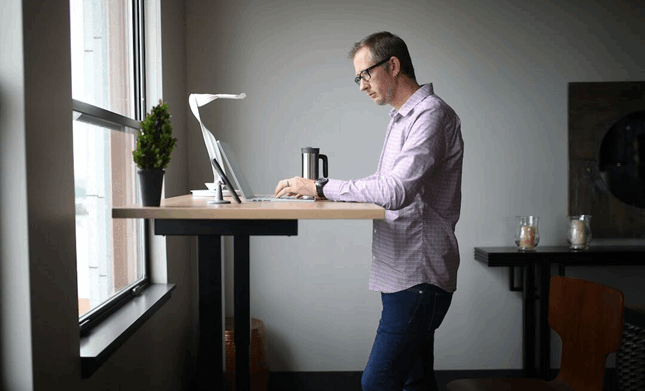
A proper desk setup can make or break your workday — especially if you’re using a standing desk. Monitor height, footwear, and how often you move around matter more than most people realize.
Repetitive strain injuries sideline millions of Americans every year, and the numbers back it up. The CDC found that 9% of adults reported experiencing one in a three-month period, and nearly half of that group had to put their normal lives on hold for at least 24 hours. If you’ve got kids to care for, a job to show up for, or a household to run, even one day down can throw everything off.
Should you abandon your standing desk? Not necessarily. Balance is key, along with proper use of these workstations.
Are Standing Desks Actually Beneficial?
Standing desks have benefits, but you need to know how to use them. Don’t stand all day because you think it’s the gold standard. In most instances, it’s actually counterproductive and can cause you to develop pain in your:
- Back
- Legs
- Feet
- Neck
- Shoulders
Instead, aim to move your body throughout the day. Change positions and rest when needed. Don’t be afraid to move around.
When your body twinges or hurts, pay attention. It might be trying to tell you something about your standing desk.
As part of pain-free workspace tips, the right setup plays a huge role in how you’ll feel. Pay close attention to the following:
- Computer monitor height
- Keyboard placement
- The type of shoes you’re wearing
Start With Desk and Monitor Height
When you set up your monitor, keep it at eye level to ensure proper office ergonomics. Some people assume it should be slightly lower, but that forces you to tilt your neck downward. Instead, look straight ahead at your computer screen to reduce unnecessary neck strain.
When positioning your keyboard, keep your elbows at a 90-degree angle. The goal is for relaxed shoulders to help reduce desk pain and strain.
Don’t Ignore Your Feet
Don’t overlook this if you work from home, especially if you go barefoot a lot. When you stand at a desk for part of the day, footwear is a non-negotiable part of any comfortable workstation setup. If you have floors or shoes with little to no arch support, you may experience pain later.
Feet For Life offers shoes designed for comfort and support, especially for long hours of work. Although it might not seem like a big upgrade, elevating your shoe game is a simple way to help prevent pain when using a standing desk.
Use an Anti-Fatigue Mat
You may not even know it, but an anti-fatigue mat can reduce pressure on your joints. These specially designed mats provide a cushioned surface. Their ergonomic designs help to keep your legs from locking up as you stand at your desk.
Alternate Between Positions
A common misconception is that standing desks mean you must stand all day. Instead, mix sitting and standing, and move around whenever you can. What matters is listening to your body and not pushing yourself if you feel any pain or discomfort.
If you’re busy, consider taking a quick walk around the room to avoid standing still all day.
Maintain Proper Posture While Standing
Your posture plays an important role in pain management when using a standing desk. People often lock their knees or lean too far forward. This can strain your joints and lower back.
Instead, keep your body in a relaxed, neutral position. Don’t put all your weight on one leg; instead, try to evenly distribute it between both legs. Keep your knees lightly bent to prevent them from absorbing too much pressure.
Your stomach muscles also matter for posture, so be mindful of whether they’re engaged during the day. This doesn’t mean you need to do standing crunches. Instead, try to keep them gently engaged to help take some pressure off the rest of your body.
Try not to slouch. If you feel yourself tightening or tensing, take a minute to focus on your posture. It might not sound like much, but a few small adjustments might be the difference between a comfortable experience at your standing desk and one that leaves you in pain.
Frequently Asked Questions
How Long Should You Use a Standing Desk Each Day?
A good rule of thumb is to use your standing desk for 20 to 30 minutes for every hour you sit. What matters is sustainability; switching between sitting and standing is better than staying stationary all day.
Can a Standing Desk Really Reduce Back Pain?
It can help, but it needs to be part of an ergonomic office setup. Lack of movement can make back pain worse, and by standing for too long, you may experience muscle fatigue and unnecessary pressure on your spinal discs.
Is Sitting Actually Bad for You?
Sitting isn’t inherently bad for you. What’s unhealthy is sitting for long periods of time without getting up and moving around. This is when you may feel joint stiffness and pain.
Small Changes to Your Desk Setup Make a Huge Difference
Whether you love your standing desk or simply want to give one a try, these workstations can be a wonderful addition to any home office, as long as they’re used correctly. Proper posture, a well-set-up desk, and comfortable, supportive shoes can help prevent discomfort and injury.
If you’re experiencing any type of strain, your body is trying to tell you something. At
Horine Chiropractic, we understand how the human body works and can help you determine what needs adjustment.
If you’re in pain, don’t ignore it. For many people, a chiropractic expert can pinpoint the root of their problem by focusing on potential musculoskeletal issues.
If you’re ready for a pain reduction plan or simply want to feel your best, contact us today and schedule your next visit!