
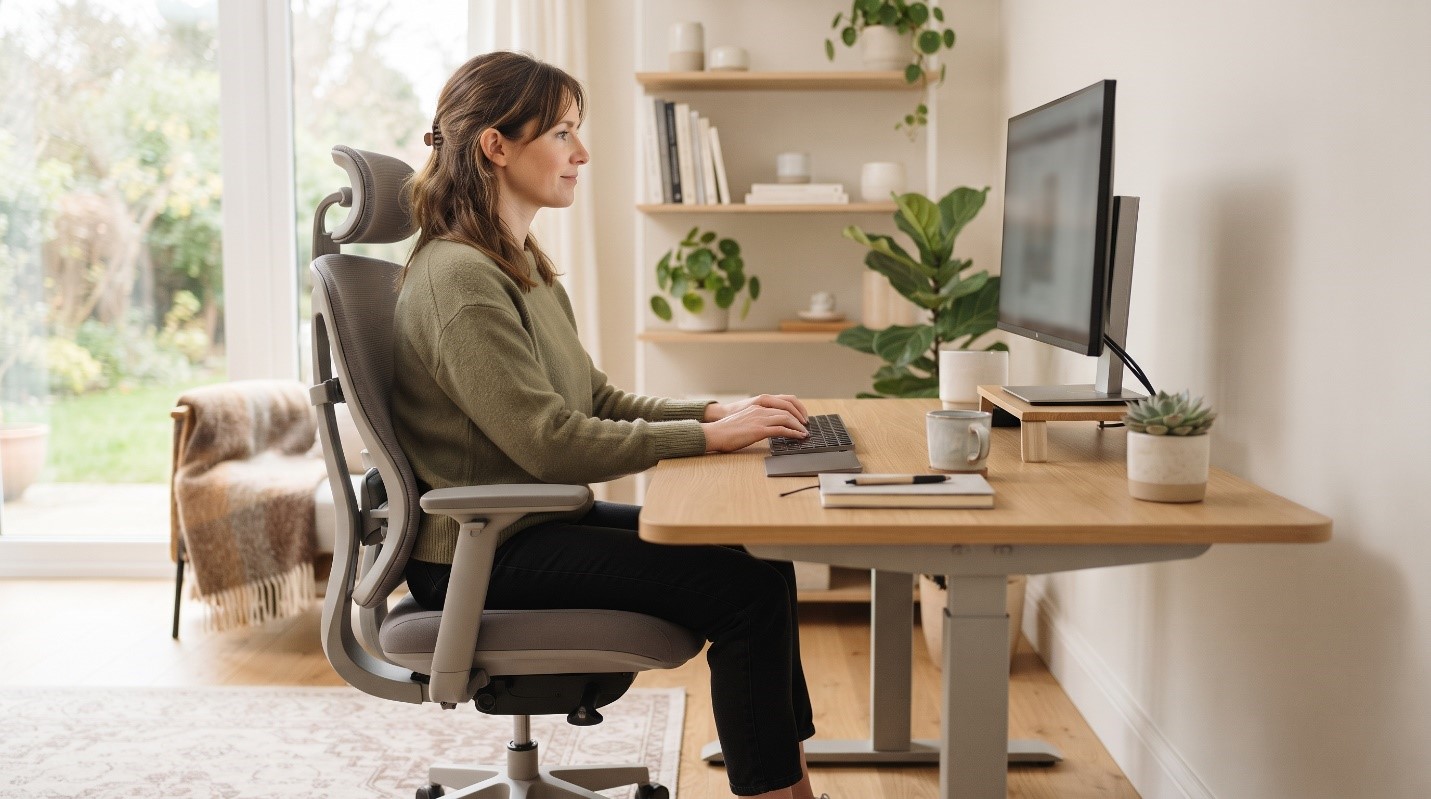
How to Find the Right Chair and Desk for All-Day Comfort
To find the right chair and desk for all-day comfort, choose furniture that supports the natural curves of your spine, keeps your wrists level, and allows your monitor and keyboard to sit at a comfortable height. This prevents neck and low back pain by keeping your body aligned rather than straining to compensate. Poor posture and unsupportive furniture not only cause everyday aches and stiffness — over months and years they can gradually contribute to tension headaches, shoulder tightness, and nagging low back discomfort that follows you home long after the workday ends.
The good news is that comfort at a desk is rarely about buying the single most expensive chair in the store. It comes down to fit and adjustability: a workstation that adapts to your body, rather than forcing your body to adapt to it. This guide walks you through what to look for, how to set everything up, and small habits that keep you feeling good from your first cup of coffee to the end of the day.
Why Your Chair and Desk Matter More Than You Think
Most of us spend a large portion of our waking hours seated. When your setup fits well, your muscles do only the work they are meant to do and the deeper structures of your spine share the load evenly. When it fits poorly, smaller muscles are asked to hold you up for hours, which leads to fatigue, stiffness, and discomfort.
A well-designed ergonomic chair and desk setup helps in three main ways:
- It supports the natural inward curve of your lower back so you are not slumping.
- It keeps your head balanced over your shoulders instead of drifting forward toward the screen.
- It positions your arms so your shoulders can relax rather than creep up toward your ears.
Common Causes of Desk-Related Discomfort
Discomfort at a workstation usually builds up quietly. A few of the most common contributors include:
- A chair with no lower-back support, which encourages slouching.
- A desk that is too high or too low, forcing you to shrug your shoulders or hunch forward.
- A monitor placed too low, so your chin drops and your neck bends for hours.
- A keyboard and mouse too far away, which pulls your shoulders and arms forward.
- Staying in one position too long, even a good one, so muscles tire and joints stiffen.
- Feet dangling without support, which shifts pressure to the backs of your thighs.
Any one of these can be manageable on its own. Stacked together, day after day, they are what turn “a little stiff” into “why does my neck always hurt?”
Warning Signs Your Setup Needs Attention
Your body often signals a poor fit before pain becomes constant. Watch for:
- Neck, shoulder, or upper-back tightness that eases on weekends
- Low back aching that worsens the longer you sit
- Tingling, numbness, or a “pins and needles” feeling in the hands or wrists
- Headaches that build during the afternoon
- Frequent fidgeting, shifting, or the urge to stand and stretch
These are cues to adjust your workstation — not something to simply push through.
How to Set Up a Chair and Desk for All-Day Comfort
You can dramatically improve comfort with a few thoughtful adjustments. Work through these steps in order:
- Set your chair height first. Your feet should rest flat on the floor (or a footrest), with your knees roughly level with your hips.
- Support your lower back. Adjust the lumbar support, or add a small cushion, so it fills the natural curve of your lower spine.
- Relax your shoulders and set your elbows. Your elbows should bend near a right angle, close to your sides, with forearms roughly parallel to the floor.
- Match desk and keyboard height to your arms, not the other way around. Your wrists should stay level — not bent up or down — while typing.
- Raise your monitor. The top of the screen should sit at about eye level, an arm’s length away, so you look slightly down rather than tilting your head.
- Bring your mouse and keyboard close. Keep them within easy reach so you are not stretching forward all day.
What to Look For When Buying
If you are shopping, prioritize adjustability over marketing claims. A supportive chair generally offers adjustable height, adjustable lumbar support, and armrests you can raise or lower. A desk that allows some height change — including a sit-stand option — gives you flexibility as your needs change through the day.
Simple At-Home and In-Office Habits
Even a perfect ergonomic desk height cannot replace movement. The healthiest posture is often your next posture. Try to:
- Stand, stretch, or walk for a minute or two every 30–45 minutes.
- Roll your shoulders back and gently tuck your chin a few times each hour.
- Alternate between sitting and standing if you have an adjustable desk.
- Keep frequently used items within arm’s reach to reduce twisting and reaching.
A few gentle desk-friendly stretches for the neck, shoulders, and lower back can also ease built-up tension during long sessions.
How Chiropractic and Postural Care May Help
If discomfort lingers despite a good setup, hands-on care may help address the muscle tension and joint stiffness that build up from prolonged sitting. A chiropractor or musculoskeletal specialist can assess your posture, identify areas that are moving too little or working too hard, and suggest targeted adjustments, stretches, or strengthening. This kind of care is meant to support healthy movement and ergonomics — not replace them. Think of it as one part of a bigger picture that also includes your workstation and daily habits.
When to See a Healthcare Professional
Consider reaching out to a healthcare provider if:
- Pain persists for more than a couple of weeks despite adjusting your setup
- Discomfort interferes with sleep, work, or everyday activities
- You notice recurring numbness, tingling, or weakness in your hands or arms
- Symptoms keep returning even after rest
Red Flags — Seek Prompt Medical Attention
Certain symptoms are not typical “desk aches” and deserve urgent evaluation. Seek prompt or emergency care if you experience:
- Sudden, severe, or unrelenting back or neck pain, especially after a fall or injury
- Progressive weakness, numbness, or clumsiness in an arm or leg
- Loss of bladder or bowel control
- Numbness in the groin or inner thighs
- Fever, unexplained weight loss, or night pain alongside back or neck pain
These may point to a more serious condition and should be checked without delay.
Preventing Problems Long-Term
Long-term comfort is a routine, not a one-time purchase. Re-check your setup whenever you change desks, chairs, or laptops. Keep moving throughout the day, stay generally active outside of work, and pay attention early when your body signals strain. Small, consistent adjustments prevent the slow build-up that leads to chronic discomfort.
Frequently Asked Questions
- What is the most important part of an ergonomic desk setup? There is no single “most important” piece, but supporting your lower back and positioning your monitor at eye level tend to make the biggest difference for neck and back comfort.
- Do I really need an expensive chair? Not necessarily. Adjustability matters more than price. A moderately priced chair you can fit to your body often outperforms a costly one that does not adjust.
- How high should my desk be? High enough that your elbows bend near a right angle and your wrists stay level while typing, with your shoulders relaxed. Match the desk to your arms rather than choosing a fixed “standard” height.
- Are standing desks better than sitting? Alternating between sitting and standing is generally more comfortable than doing either all day. Movement and variety are the real goals.
- Can a better setup get rid of my neck pain completely? It can meaningfully reduce strain and help prevent discomfort, but results vary from person to person. If pain persists, have it evaluated by a healthcare professional.
- How often should I take breaks? A brief movement break every 30–45 minutes is a reasonable target — even standing and stretching for a minute helps reset tired muscles.
Conclusion
Finding the right chair and desk for all-day comfort is really about fit, support, and movement. When your workstation matches your body — supporting your spine, keeping your wrists level, and placing your screen at eye level — your muscles work less and you feel better for longer. Pair a thoughtful ergonomic chair and desk setup with regular movement, and you give your body its best chance to stay comfortable through even the busiest days.
Call to Action: Still dealing with desk-related neck or back tension? Our team can assess your posture and help you build a comfortable, sustainable routine. Contact us today to schedule an evaluation and take the first step toward pain-free workdays.
Medical Disclaimer: This article is for general educational purposes only and is not a substitute for professional medical advice, diagnosis, or treatment. Always consult a qualified healthcare provider about your specific symptoms or before making changes related to a health condition. If you experience any of the red-flag symptoms described above, seek prompt medical care.
Sources (general references used):
- World Health Organization — guidance on low back pain and musculoskeletal conditions (who.int)
- National Institute of Neurological Disorders and Stroke (NINDS) — back pain information (ninds.nih.gov)
Mayo Clinic — office ergonomics guidance (mayoclinic.org)